
IHSS Provider

How a recipient registers for the phone system (TTS)

7 stepsCDSS 06/2019

Independent guide based on official CDSS documents. Not affiliated with CDSS, the State of California or any county.

Before you can approve timesheets by phone, you register one time. Have these ready: your 6-digit registration code, your 7-digit case number and your date of birth.

  • Call and choose your language

    Step 1: A drawing of a telephone. Call (833) 342-5388 and press 1 for English.
    CDSS image, TTS Recipient Registration, 06/2019

    Call (833) 342-5388. Press 1 for English, 2 for Spanish, 3 for Armenian or 4 for Chinese.

    Press on your phone:1

  • Say you are a recipient

    The system asks if you are a recipient or a provider. If you are a recipient, press 1.

    Press on your phone:1

  • At the Main Menu, press 3

    Press 3 for Registration. Then press 1 to continue.

    Press on your phone:3 then 1

    No registration code? Press 0 to be transferred to the IHSS Service Desk.

  • Enter your registration code

    Enter your 6-digit registration code, then press #.

    Press on your phone:###### #

    The code was mailed to you. If you cannot find it, contact your local county IHSS office.

  • Enter your case number

    Enter your 7-digit case number, then press #.

    Press on your phone:####### #

    Your case number is on any notice of action you received.

  • Enter your date of birth

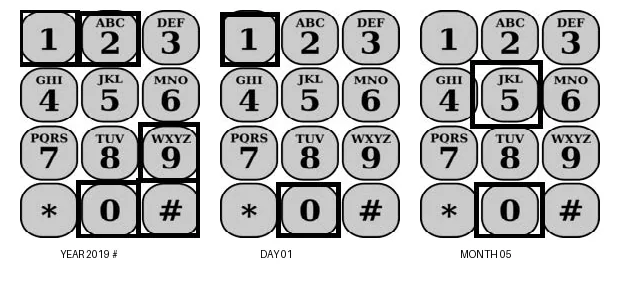
    Step 6: Keypads with keys outlined for May 01, 2019: month 05, day 01, year 2019, then #.
    CDSS image, TTS Recipient Registration, 06/2019

    Enter a 2-digit month, a 2-digit day and a 4-digit year, then press #. For May 12, 1976, enter 05121976.

    Press on your phone:MM DD YYYY #

  • Create your passcode

    Enter a 4-digit number to use as your passcode, then press #. Your registration is complete.

    Press on your phone:#### #

    Keep your passcode secure and do not share it with anyone. You use it each time you log in.

Step 1

All steps in one list
  1. 1. Call and choose your language

    Call (833) 342-5388. Press 1 for English, 2 for Spanish, 3 for Armenian or 4 for Chinese.

    Source: CDSS TTS Recipient Registration, 06/2019, page 2

  2. 2. Say you are a recipient

    The system asks if you are a recipient or a provider. If you are a recipient, press 1.

    Source: CDSS TTS Recipient Registration, 06/2019, page 2

  3. 3. At the Main Menu, press 3

    Press 3 for Registration. Then press 1 to continue.

    No registration code? Press 0 to be transferred to the IHSS Service Desk.

    Source: CDSS TTS Recipient Registration, 06/2019, page 2

  4. 4. Enter your registration code

    Enter your 6-digit registration code, then press #.

    The code was mailed to you. If you cannot find it, contact your local county IHSS office.

    Source: CDSS TTS Recipient Registration, 06/2019, page 3

  5. 5. Enter your case number

    Enter your 7-digit case number, then press #.

    Your case number is on any notice of action you received.

    Source: CDSS TTS Recipient Registration, 06/2019, page 3

  6. 6. Enter your date of birth

    Enter a 2-digit month, a 2-digit day and a 4-digit year, then press #. For May 12, 1976, enter 05121976.

    Source: CDSS TTS Recipient Registration, 06/2019, page 3

  7. 7. Create your passcode

    Enter a 4-digit number to use as your passcode, then press #. Your registration is complete.

    Keep your passcode secure and do not share it with anyone. You use it each time you log in.

    Source: CDSS TTS Recipient Registration, 06/2019, page 4

Submitted your timesheet? Here is what happens next

  1. 3

    Recipient approves The recipient reviews the hours and approves or rejects the timesheet

  2. 4

    The state processes and pays A complete timesheet turned in on time is usually paid within 10 days of when the state receives it (SOC 846)

  3. 5

    What comes next? Where is my pay, direct deposit, taxes, paid sick leave

Get the official guide

Who this guide is for

Recipients who want to review and approve or reject their provider's timesheets by phone. You register one time.

Get this information ready

  • Your 6-digit registration code. It was mailed to you. If you cannot find it, contact your local county IHSS office.
  • Your 7-digit recipient number (case number). You can find it on your notice of action.
  • Your date of birth.

How to enter your date of birth

Enter a 2-digit month, a 2-digit day and a 4-digit year, then press #. For May 12, 1976, enter 05121976.

If you enter a wrong number

The TTS tells you the information is incorrect and asks you to enter it again. If you enter it wrong again, the TTS asks you to press 0 for help. You are then transferred to the IHSS Service Desk.

Your passcode

You create a 4-digit passcode at the end of registration. You use it each time you log in. Keep it secure and do not share it with anyone.

After you register

You can review and take action on pending timesheets. You can also review approvals and denials you made in the previous 3 months.

Source: IHSS Telephone Timesheet System, Recipient Registration, Revised 06/2019.

CDSS: TTS Recipient Registration, 06/2019